

Contents

UA Pro is a Ukrainian Super App that combines a complete restaurant automation system (QR menu, order taking, a KDS kitchen display, split bill and tipping, table reservations), online booking for the service industry with parallel booking of several procedures at once, and hotel booking with a personal guest portal — in one account, with Monobank payments and no commission on the menu. Below is a full, category-by-category list of the features that are already live.
Restaurants, coffee shops, bars, hookah lounges, salons, private specialists, hotels and holiday resorts have spent years juggling a dozen disconnected services: menu separately, booking separately, payment separately, reservations separately. UA Pro replaces that “zoo” with a single account. This article is an exhaustive guide: everything we have already built, with no fluff — just a list and a short description of every feature.
Restaurant: a complete digital system for your venue
From a QR menu on the table to a kitchen display and split bill — everything a coffee shop, restaurant, bar or hookah lounge needs.
Online QR menu
The guest scans the QR on the table and instantly sees the menu in the browser — nothing to install.
Categories and dishes are translated — a foreign guest reads the menu in their own language.
Every dish has a photo, weight or volume, calorie count, protein-fat-carbs and prep time.
Vegan, vegetarian, gluten- or lactose-free, halal, spicy, kids’ meals, allergens — the guest filters to their needs.
Sale price, “New”, “Best seller”, “Recommended” — set manually or automatically by sales.
The kitchen or bar temporarily hides an item with a reason — the guest won’t order what’s out.
Colors, logo, cover, social links, display mode (feed or tabs) — a menu in your brand style.
Guests rate individual items — you see what the room truly loves and what to drop.
QR tables and rooms
Any number of rooms and tables; each table has a seat count and a status (free, occupied, reserved, cleaning) in one tap.
Its own QR code opens the menu for that exact table — the order is instantly “tied” to the right table.
4 styles, 8 gradients, your logo in the center, auto-contrast — and a guarantee the code scans.
A ready table card (№ + room + “scan the menu”) to print or as PNG — right from the tables page.
A seating token stops an old QR screenshot from adding items to someone else’s bill — the table session is controlled.
“Waiter”, “Bill”, “Help” buttons — staff see the call and confirm it to the guest.
Orders and kitchen (KDS)
↔ How an order from the table works
A separate screen for the kitchen, bar, hookah; a timer and color-coded urgency, plus an “all ready” button.
The system determines the station by dish name and category — the waiter sorts nothing by hand.
A repeat tap on a weak connection won’t create a second order — idempotency at the server level.
Every change is recorded with the staff name — you see who accepted, cooked and served.
It’s easy to add items to an open order or change the status of each dish.
Download by date and status — for accounting and reconciliation.
Payment, split bill and tipping
The guest pays whichever way is convenient; online payment via Monobank acquiring straight from the phone.
A shared table bill can be paid three ways: “mine”, “evenly” (2–20 people) or “the whole bill”.
The server calculates every amount, with protection against double payment — the balance drops live.
Ready buttons for ≈10 / 5 / 2.5 % or a custom amount; tips go on a separate line and don’t reduce the bill.
Automatic service charge and tax rate on the order — per your settings.
For hotel guests — the order is added to the room bill and settled at checkout.
Waiters, reservations, hookah, analytics
All active orders and calls on one screen; a personal PIN confirms who performed an action.
The guest books a table online; the system auto-selects a table by capacity, room and with no time overlaps.
A booking with a Monobank prepayment is confirmed only after payment — fewer “empty” tables.
Hookah has its own KDS screen and, if needed, a separate bill; items go to the hookah master automatically.
Revenue, average check, top dishes, station load, hourly and daily charts, prep time.
Guests rate food, service and atmosphere separately; there’s bot protection and a rating for each dish.
Hours by day (even “past midnight”), venue status, takeaway ordering.
Order statuses and calls update live (SSE) — no page reloads.
Scale: the system works both for a coffee shop with three tables and for a restaurant with several rooms — the number of zones, tables and kitchen stations is unlimited.
Delivery and payment straight to the venue
Turn on delivery with one toggle — guests order right from the venue page, with no aggregators or their commissions.
A list of districts each with its own fee, or a radius with automatic distance calculation from the guest's address.
Base + per kilometer, free delivery above a threshold, minimum order — the amount is calculated by the server.
Online in advance or in cash to the courier; the provider is chosen by the venue's country and the money goes straight to you.
Services: online booking that saves time
Salons, masters, studios, private specialists — client booking, pricing, staff, reminders and calendar sync.
The client picks a service, date, free slot and master; the schedule is computed from working hours, breaks and existing bookings.
Several procedures at once with different masters: the system finds a common window and creates all bookings as one all-or-nothing group.
The client cancels a booking with the booking number and 4 phone digits; for a group — all bookings at once, with brute-force protection.
Base + variants (fixed, “from”, range), prices in kopecks, different durations; the booking remembers the chosen rate.
Specialist profiles: experience, skills, a work gallery/portfolio, separate prices and schedules; a public master page.
Confirmation and a reminder 2 hours before; the vendor and master get a Telegram notification about a new booking.
A client↔master chat with a video-call option is created for each booking.
Google Sheets, an iCal feed (Google/Apple/Outlook) and CSV export — your bookings wherever it suits you.
Cakes, handmade, custom production: a product showcase with options and a request without a slot, with price agreement.
A client base builds itself from bookings; bonuses, gift certificates, reviews tied to a visit.
Hotels: booking + guest portal
The standout feature of this line — a guest who books through us gets a personal portal for their room with a dozen services in their phone.
↔ What the guest portal can do
Filters by city, type, stars and amenities; price and availability are computed by dates on the server.
An atomic room hold inside a transaction — the last room is never sold twice.
The portal shows a countdown to check-in and to check-out, a “Your room” card and Wi-Fi.
Room service and minibar roll into one bill, settled at the front desk on checkout.
Hotel, apart-hotel, villa, hostel, resort, glamping, sanatorium, kids’ camp, guesthouse, retreat and more.
Hotel and room descriptions are translated; the page is indexed in Google in the language it’s actually translated into.
A new booking, a room-service order, a guest request and an extension request — straight to the portal (and SMS if offline).
Rooms, availability, rates, a price calendar, a request inbox, the booking lifecycle from check-in to check-out.
Why it works as one whole
Individual features exist in many products. UA Pro’s strength is that every line lives in one account and reinforces the others.
Restaurant, services and hotel — under one login and one Monobank payment, with no “zoo” of services.
The interface and venue content are shown in a language your foreign guests understand.
The venue pays a fixed subscription for the system, not a percentage of every order or booking.
Venue pages have markup for Google and “citations for AI” — you’re found both in search and in ChatGPT.
A badge button with a backlink to your site — the venue gets 30 days of MEGA SEO for verifying it.
Native apps for the guest (scan QR, menu, tracking) and for staff are in the works — on top of the same features.
What’s already in development
We’re honest about splitting what’s done from what’s planned. Coming up next — availability sync channels via iCal and an open API, an online surcharge for stay extensions, and expanded loyalty scenarios. The core lines are already running in production.
Want to try it? Start with the line closest to you: the restaurant system, online booking for services or hotel booking. Register your venue on the business page.
What UA Pro's QR menu can do in 2026: more than a menu
Over the past year the system has grown from a "menu behind a QR code" into the venue's full loop — from the guest's table to the kitchen and back office. Here is what a restaurant or café gets right after connecting:
For the guest at the table
- Ordering from the table — the guest sends the order with notes for the kitchen and watches statuses from "Accepted" to "Served" with a timer
- Dish variants — portion size, extras, a hookah or coffee configurator; the price recalculates instantly
- Waiter call in one tap — call the waiter, ask for the bill or help
- Bill splitting — everyone pays their share, equally or in one amount; the table's payment progress is visible to all
- Cashless tips — for the team or your waiter
- Dish ratings and favourites — the rating shows right in the menu
- Transparent bill — the service charge and taxes are visible already in the cart, no surprises on the receipt
For the floor and the kitchen
- Waiter screen — guest calls, dishes ready to serve and active table orders in real time on the phone
- Kitchen stations (KDS) — an order queue for the kitchen, bar or pizzeria on a tablet with statuses and prep time
- Confirmed acceptance, table booking with dish pre-order, delivery and pickup with automatic cost calculation
A storefront in your brand
- Dish card layout — large photos, compact cards or rows; brand colours, logo and QR codes in your own design
- Combo promos — "2+1" and "dish + free drink"; the discount is calculated in the cart automatically
- Category schedule (breakfasts until 12:00, weekday lunch) and a one-tap stop list
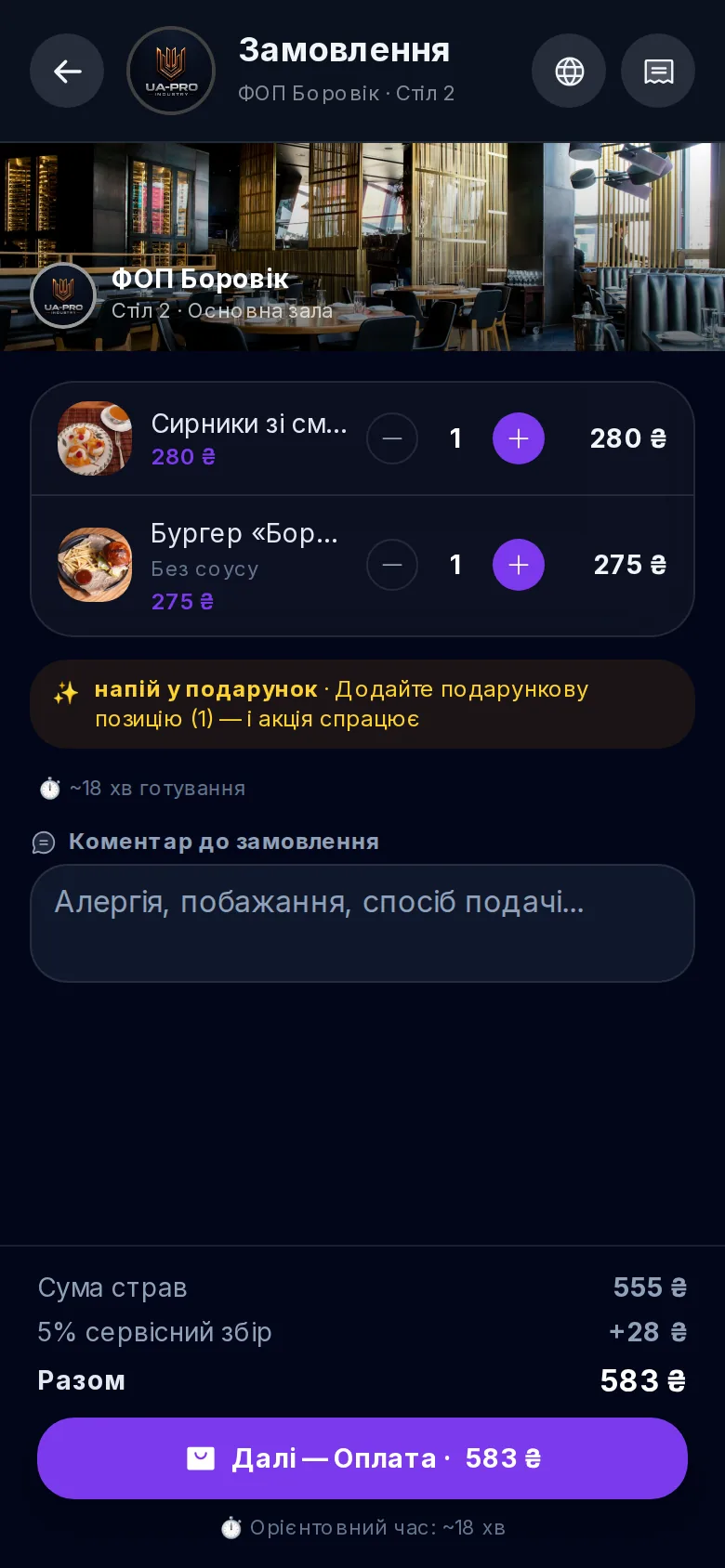
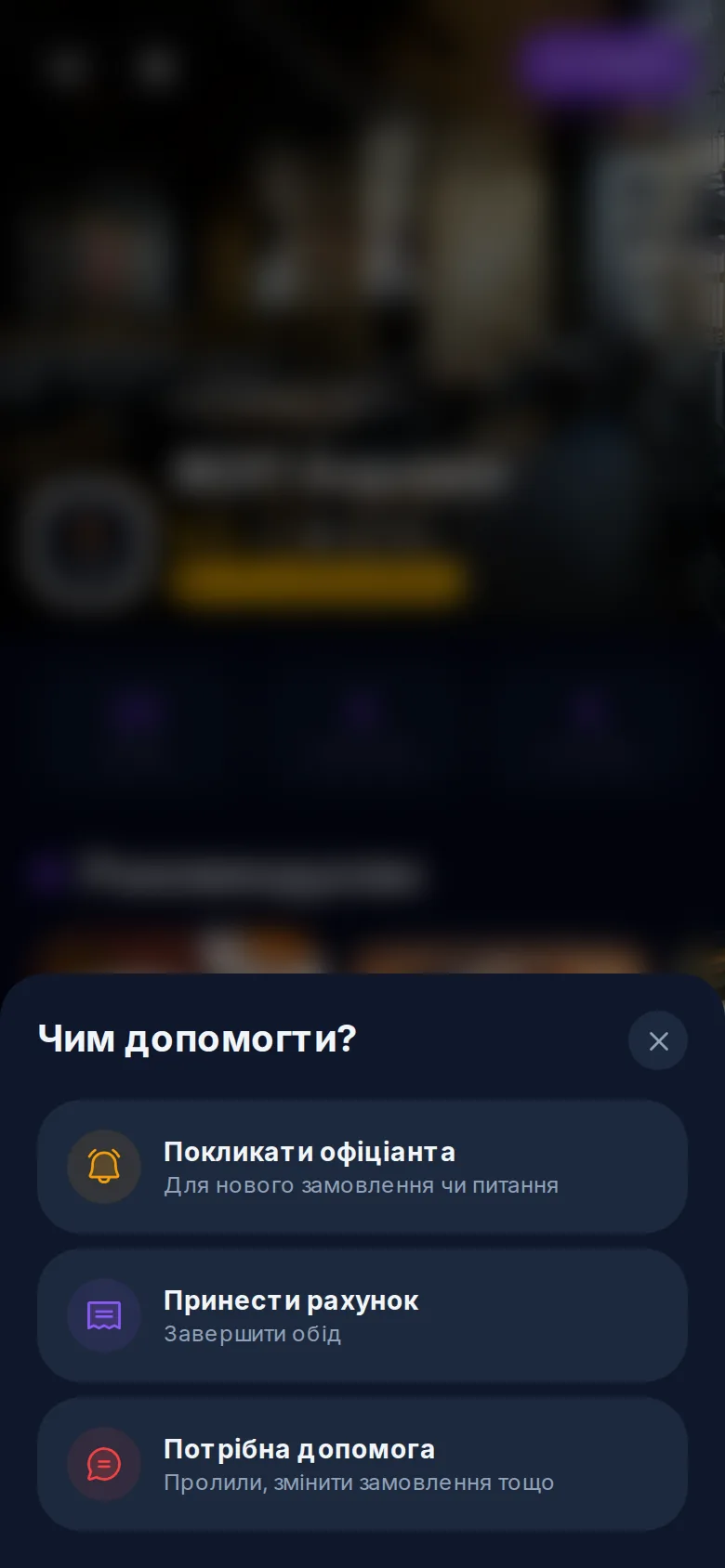
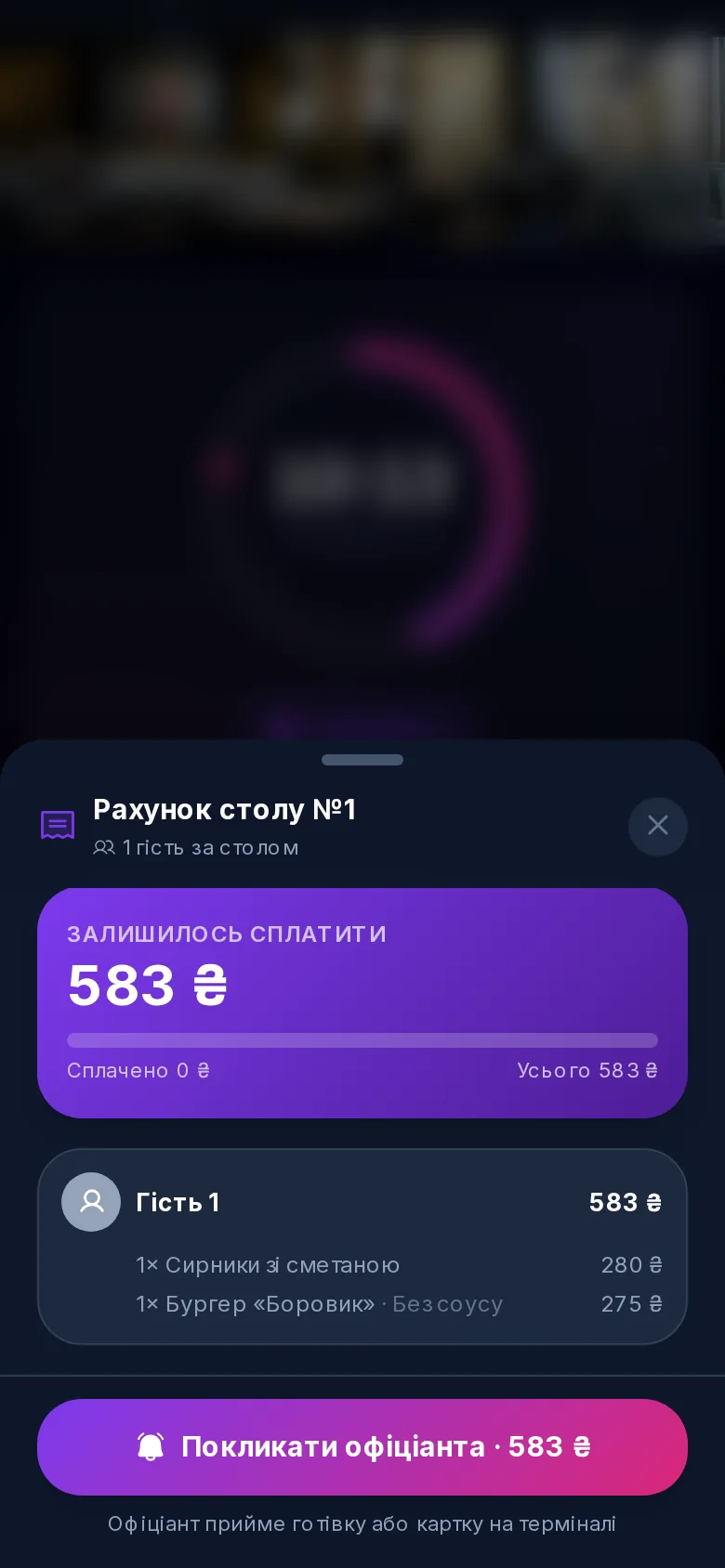
Oblik Pro: the venue's back office (add-on)
A separate management module in the same dashboard: stock and batches with expiry dates (the system warns before anything expires), recipe cards that write off ingredients on every sale, the economics of each promo before launch, staff shifts and payroll, reports and ABC analysis of dishes.
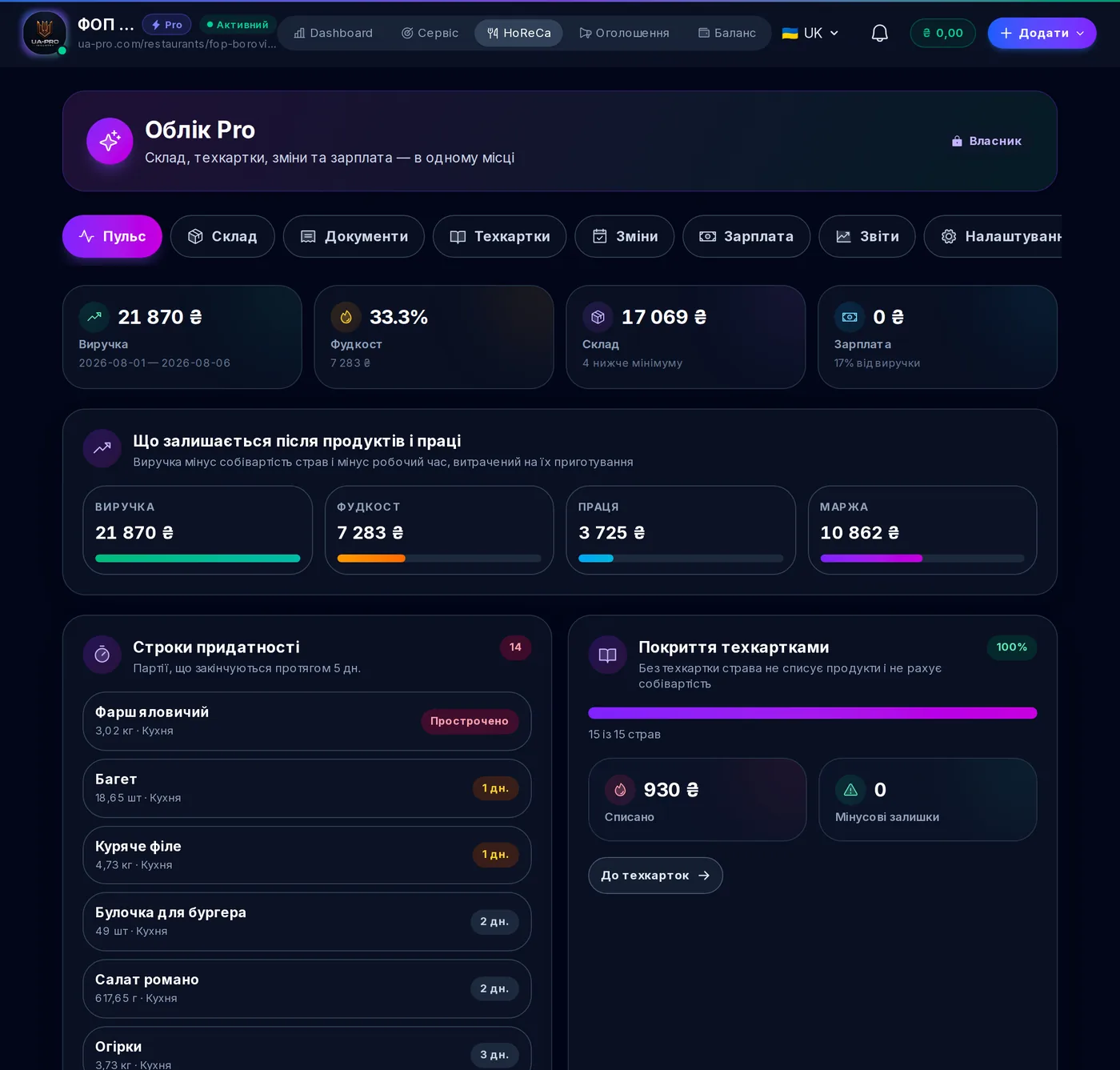
See it all live in real venues on UA Pro — or join the "100 Founding Restaurants" programme and get a free year of the top plan.
Frequently asked questions
How much does a QR menu in UA Pro cost?
Is there a split bill?
Can you book several procedures at once with different masters?
How does a guest order food to a hotel room?
How many tables and rooms does the system support?
Is hookah supported?
What payment methods can a guest use?
What languages does the platform work in?
UA Pro for venues
A restaurant, café or bar?
QR menu, ordering from the table, a kitchen display and analytics. Half the price of competitors, 30 days free.